
Tekmetric companion. Not a replacement.
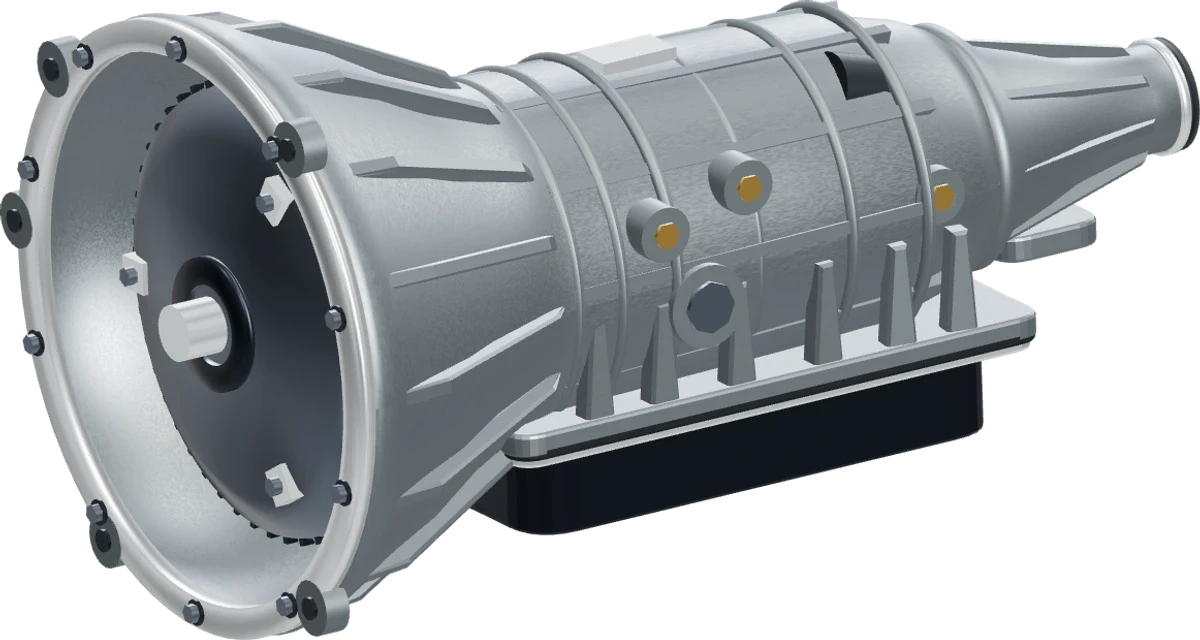
A three-dimensional illustration of the 6L80 transmission. Explore the torque converter, pump, clutches, planetary assemblies, housing, and hydraulic controls. The exploded arrangement is illustrative.
Built for transmission shops
A clearer diagnosis.A shop that moves.
Historical evidence for the next check — not automatic answers. Your team confirms the diagnosis.
Engineering in motion6L80Six-speed automatic transmission
01 / 04The complete unit
AI shows what it used and what it didn't.
No committed diagnosis case without a decoded VIN.
No shop counts, success rates, or invented reviews.
Founder-led walkthrough. Talk to Laurence.
Inside the workflow
See the work as it moves.
A guided look at the connected workspace your team uses from intake through verification.
AI CAPABILITY WALKTHROUGHInteractive shop demonstration · Real telemetry and repair orders from Arlington & Houston
Intake & Evidence
Reported concern anchored to verified vehicle identity.
Customer complaint, decoded VIN, and initial diagnostic scanner codes are captured together in your private workspace.
- 01Customer ComplaintHarsh warm 2-3 upshift · shudder under acceleration
- 02Vehicle Identity17-character VIN verified · 10R80 transmission context attached
- 03Scanner IntakeDiagnostic trouble codes P0751 & P2700 attached to case
- 04Data BoundaryAll photos, notes, and VIN data remain private to your shop tenantTenant-Private
Stage 1 of 4: Intake & Evidence
Less chasing. More clarity.
One repair. Everyone on the same page.
Give each handoff the context it needs. The front desk, technicians, parts team, and manager work from the same job record.
Turn evidence into a next step.
Compare the initial hypothesis with what the road test and scanner reveal. See supporting evidence and what is still missing.
Explore diagnostic AIKeep the job close at hand.
Capture the complaint, review the work, and record findings in the browser, with views designed for the team doing the repair.
Explore the mobile workflowConnect diagnosis to the parts.
Build a parts packet from the confirmed diagnosis. Keep required items, likely needs, and teardown discoveries distinguishable.
Explore parts coordinationMake the final check count.
For jobs managed through a Locomotion diagnosis case, a passing verification is required before invoicing, delivery, and closeout.
See the repair workflowHow it works
From “something feels wrong” to a verified repair.
Five connected stages. Clear evidence at every decision. Explore what your team records and reviews along the way.
Stage 01 / 05
Start with the complaint.Confirm the vehicle.
Capture symptoms by voice or typing. A decoded VIN is required before creating a managed diagnosis case or running Analysis A.
- Capture
The customer's own description of the problem.
- Identify
The vehicle and transmission context from the VIN.
- Continue
A diagnosis case connected to the work order.
Smart Intake · VIN Gate
RO-43680 · TekmetricVoice Complaint Transcript0:24 · Verified
“Shifts hard from 3rd to 4th once warm on the highway. Definite vibration/shudder around 45 mph under light acceleration.”
Vehicle & VIN Decode:1FTFW1ED4JFA...
2018 Ford F-150 5.0L V8
Drivetrain: 10R80 10-Speed Auto
Next: Diagnostic Case Ready for Analysis AProceed to Diagnosis
Connected to your operation
Build on the tools your shop already uses.
Bring active Tekmetric jobs into a diagnosis workflow when your team chooses. Review accounting, payment, and inventory connections with us for your specific setup.
Data PipelineNon-destructive bridge with your existing shop stack
Tekmetric → Locomotion OS → PartsTech → QuickBooksTekmetricAdditive Mirror
Active work orders adopt into diagnosis without mutating base records.
Locomotion OSDiagnosis Gate
Dual-stage advisory AI, VIN gating, and mandatory road-test verification.
PartsTechLive PO Cart
Real-time pricing and warehouse stock staged directly to the work order.
QuickBooks / StripeVerified Closeout
Invoice release gated on verified post-repair road test telemetry.
Tekmetric
Work orders & history
Bring Tekmetric work orders and repair history into context. Your team chooses when an active order enters the Locomotion diagnosis workflow.
PartsTech
Supplier search
Search connected supplier offers and review the price, stock, and delivery information returned with each result.
QuickBooks Online
Accounting context
Connect your account to access accounting data and compare invoice records with shop operations.
Stripe
Online invoice checkout
Give customers an invoice payment link. The checkout amount comes from the invoice's outstanding balance.
Connections depend on your accounts and setup.
Explore all connectionsMake the evaluation practical
What could less admin mean for your team?
Adjust both example values to explore time you could free up from administration and coordination.
Potential hours per month
At the same volume for 12 months
105 hours
Jobs × minutes saved ÷ 60 = hours per month
An example based on your inputs, not measured product results or a guarantee.
Transmission software. For shops that already exist.
Locomotion is SaaS for transmission shops: diagnosis, evidence, parts, and verification in one workflow. We are not operating physical repair locations. The quotation module is still available if you need a vehicle-specific estimate.
Start with your workflow. Get a clear proposal.
Tell us about your locations, team, and current systems. We will review the fit, available integrations, onboarding, and software pricing with you.
Explore pricing & setupTELEPHONE ASSISTANT MODULE
Your front desk. Even after closing.
A 24/7 telephone assistant for transmission shops. Explore how an incoming call becomes a request your team can review, with the complaint and next step in context.
Before you get started
A few things worth knowing.
Who is Locomotion OS for?
Transmission and specialty repair shops that want diagnosis, evidence, parts coordination, repair progress, and verification in a connected workflow. A demo is the best way to review the fit for your team and existing systems.
Does AI make the final diagnosis?
No. Analysis A and B provide advisory hypotheses with inputs, evidence, missing information, and confidence rationale. Your team reviews and edits the final conclusion, assignment, parts decisions, and verification.
Can we keep using Tekmetric?
Yes. Locomotion uses an additive Tekmetric mirror. Your team can bring an active work order into a managed diagnosis case when needed. Historical records support research; they are not automatically converted into diagnosis cases.
Do all jobs require verification before invoicing?
The verification requirement applies to Locomotion-managed diagnosis cases, including Tekmetric jobs adopted into that workflow. A passing result is required before invoice, delivery, or closeout. Jobs that remain only Tekmetric mirror records do not have this additional requirement.
Are licensed reference subscriptions required?
No. The core analysis workflow uses internal repair history and structured transmission knowledge. Licensed external references are optional and depend on availability and your access.
What happens after I request a demo?
We receive your shop name and contact details, then follow up to review your workflow and arrange a walkthrough. We can discuss setup, integrations, and pricing before you decide.
Is this a founder-led pilot?
Yes. The current offer is a founder-led pilot for the first 100 shops. Historical repair records are context for the next check, not proof of a completed fix. We do not publish fake logos, shop counts, or success rates.
See it with your workflow in mindYour next repair.
Your next repair.
A clearer way forward.
Tell us a little about your shop. We will follow up to arrange a product walkthrough and discuss your setup.
No payment details required to request a demo.